How to save recipes from Instagram Reels
“Recipe in the caption!” — except the caption is 40 hashtags, the Reel is gone from your feed by dinner, and your Saved folder has 300 of them. Here's how to get the actual recipe out.
Quick answer
- In Instagram, tap the share arrow → Copy link on the Reel.
- Open Eat Matters, tap + and paste the link (or share straight from Instagram's share sheet).
- AI pulls the ingredients, amounts and steps into a recipe card — with calories, protein, fat and carbs. Save it.
The problem with Instagram's Saved folder
Instagram's bookmarks are built for rewatching, not cooking. You can't search saved Reels by ingredient, you can't scale servings, and you can't shop from them. When it's time to cook, you're scrubbing through a video with wet hands, trying to freeze-frame the ingredient list.
The recipe you saved is usually right there — in the caption, in the voiceover, in the video description. It just needs to be pulled out into a usable format once, so you never have to find that Reel again.
Step by step
- Open the Reel — from your feed, your Saved folder, or a link a friend sent you.
- Tap the share arrow, then Copy link. With Eat Matters installed you can also tap “Share to…” and pick Eat Matters directly — no copying needed.
- Paste it into Eat Matters. Tap +, choose “Import from link”, paste, and let the AI read the caption and transcribe the voiceover.
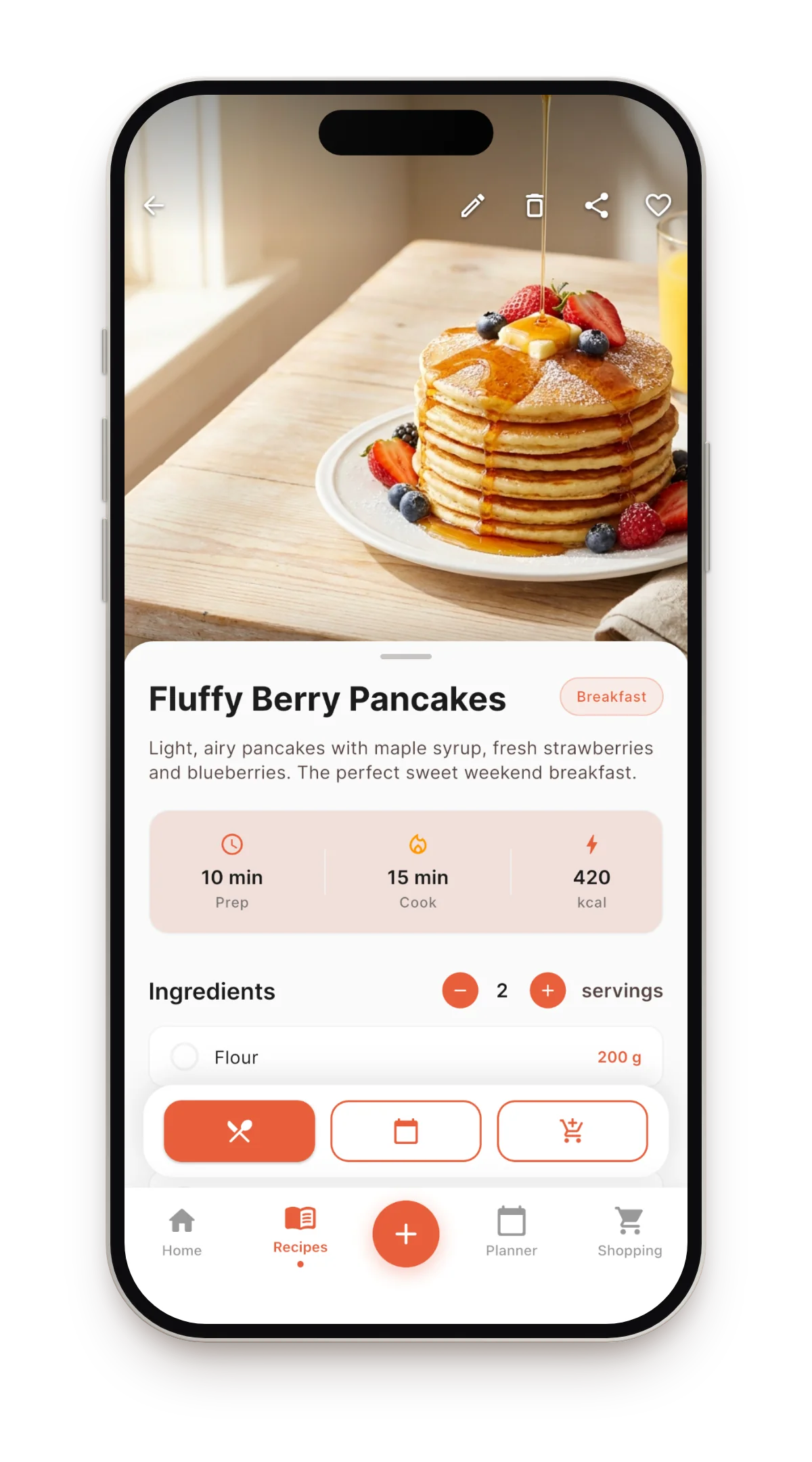
- Check the card and save. Ingredients with amounts, numbered steps, cook time, per-serving nutrition. Everything is editable if you want to tweak it.
What you get after the import
- Text, not video. Search your whole collection by name or ingredient — even mid-cooking with one hand.
- Nutrition per serving. Calories and macros calculated automatically, recalculated when you change servings.
- A plan and a list. Put the recipe on your weekly meal plan; the shopping list assembles itself and merges duplicate items.
- Any language. Italian nonna Reels and Japanese bento Reels open translated, structure intact.
Other ways people try (and why they give up)
Screenshotting the caption
You get an image of a recipe, not a recipe. No search, no scaling, no shopping list — and good luck finding it in your camera roll next month.
Comment “recipe?” and hope
The creator's bot DMs you a link… to a page with the same video. You still end up transcribing by hand.
Saving to Collections
Organized, sure — but the recipe is still trapped in a video that can be deleted or made private any day.
FAQ
Does it work with regular Instagram posts, not just Reels?
Yes — posts, Reels and shared links all work. So do TikTok, YouTube, Pinterest and any recipe website.
Is it free?
The app is free and includes 5 imports per month; recipes you type in yourself are unlimited. Unlimited imports come with Pro.
What if the caption has no amounts?
The AI doesn't rely on the caption alone — it transcribes the voiceover too, so amounts the creator only says out loud still end up on the card. Anything left over you can add in seconds.
Rescue your Saved folder
Share one saved Reel to Eat Matters and see it become a real recipe — with nutrition — in seconds.
Download on the App Store